

We are always working to enhance CatalogIt with new features and in this newsletter we want to highlight some of the recent improvements! CatalogIt regularly releases updates to the system. If you use CatalogIt on your phone or tablet, be sure to keep it updated by regularly checking for updates in the app stores, or better yet, set your phone or tablet to automatically update CatalogIt so you’re always using the latest version and benefiting from the newest updates. Your laptop or desktop will refresh automatically each time you log in or refresh the page so updates are more seamless.
You can now view every page of a multi-page PDF without downloading it first, right from the Entry record. Just click on the PDF preview when viewing an Entry (just like for images) and the “Media Viewer” screen will display the full PDF enabling you to scroll through the entire document as well as zoom in/out.
Easily view the metadata attached to any media file from the “Media Viewer” screen. The ability to view all the metadata attached to your media file is functionality typically found in a Digital Asset Management System (DAMS) but is now accessible directly within the CatalogIt app.

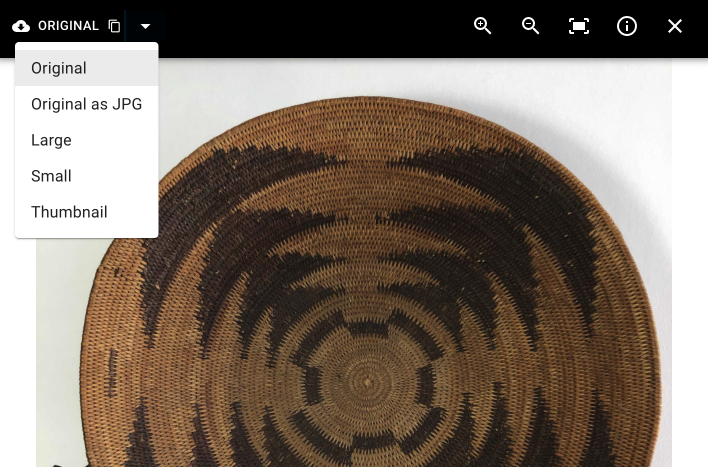
In addition to storing your original full-sized images, CatalogIt creates different versions of each image you add to your account - the version you may have cropped and/or rotated for display and a thumbnail (CatalogIt uses some of these derivatives to power the app). You can still easily download your original, unaltered file but you now can also select exactly which version of your saved image you want to download along with a few different sizes.
We’ve added support for attaching any kind of digital media to your Entry or Profile record. You can now attach those Photoshop files, photogrammetry 3D files, CAD files, or anything else. A generic “digital asset” placeholder image is substituted for the preview image if CatalogIt does not recognize the format. Note: to upload non-standard media files you need to drag and drop them into the media well in the app.
The “most recent” (or current) location is an Entry’s Location with the latest date (or the first in the list if there are no dates); an Entry can only have one “most recent” (or current) location. When viewing a Location Profile you can now toggle the associated Entry references between most-recent (those that are currently in that location) and those that have ever been at that location.
An Owner of a CatalogIt account can now manage their existing collaborators - remove users and control the level of access each of their account users has, right from the app!
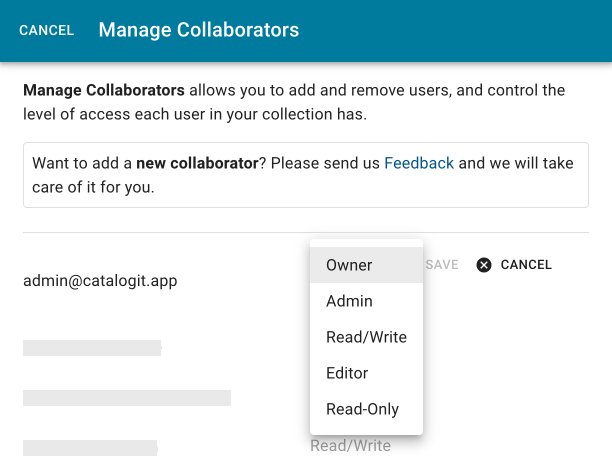
This is also a great time to review all of your current collaborators to check and see if you need to delete any users that no longer need access or to update a user’s access level to ensure they have the appropriate permissions. Simply go to “Settings,” and then to “Collaborators” to review your users.
You still need to ask us to add collaborators by using the Feedback feature from within the app or emailing us at [email protected]. If you are using a free account, those are limited to a single user. Our subscribed Personal accounts include up to three users and our subscribed Museum, Organization, and Conservator accounts include up to 8 users.
We’ve improved the way Profile references are displayed- Entry references are listed first, sorted by entry/object-id or name, and Profile references are listed below. The first 10 of each are immediately viewable, and if you’d like to see all, just click the “View All” button!

Museums solicit loans of art, artifacts, ephemera, and specimens to enhance temporary and permanent exhibitions. CatalogIt Museum and Organization accounts include a simple yet comprehensive “Loan In” profile to help track and document incoming loans. Visit our Processing Incoming Loans MasterIt article to learn more about how CatalogIt helps you manage all aspects of the incoming loan process while simplifying this cumbersome task.
Looking for other tips? Visit the MasterIt Resources Page.
How are you using CatalogIt? Let us know! We love to spotlight organizations and their unique collections in our Subscriber Spotlights as well as on our blog. We want to hear all the innovative ways you are using CatalogIt. Reach out to us at [email protected] to share your experience with us!
Follow CatalogIt! Give us a review! Tell your friends!
Click on the links below to “like” and “follow” CatalogIt on social media. Please help CatalogIt continue to grow by mentioning us in your listservs or social media posts and telling your colleagues and friends about us. Most importantly, take a moment and provide a review- your reviews are extremely important to our success! Here are a few easy ways to support us:
• Capterra
• G2
• Review CatalogIt in the App Store and Google Play.
These are great ways to spread awareness and generate interest in CatalogIt. Help us build an engaged, committed CatalogIt community!

